You've probably said yes to an order bump this week without noticing.
"Add a phone case for $9?" when you bought a phone. "Add gift wrapping?" on a birthday present. "Upgrade to a large for 50 cents?" at the cinema. Small, relevant, easy add-ons offered at exactly the moment you've already decided to buy.
They work because the hard decision — "Am I buying this?" — is already made. Saying yes to one more small, related thing is easy.
As a creator selling digital products, you can use exactly the same idea. And it's one of the easiest ways to make more money without finding a single extra customer.
What an order bump is
An order bump is an optional add-on, offered on the checkout for a product. The buyer can add it with one tap, and pay for both in one go.
For example:
- Someone buys your Notion budget template for $19. At checkout: "Add the Debt Payoff Tracker for $9?"
- Someone buys your Lightroom presets pack for $25. At checkout: "Add my mobile editing video tutorial for $12?"
- Someone buys your 8-week training plan for $39. At checkout: "Add the matching meal plan for $15?"
Not a pushy upsell. Not a popup. Just a friendly "you might also want this" at the right moment.
Why it works so well
A few reasons order bumps are so effective:
The decision is already made. Your buyer has decided to buy. They've reached the checkout. Adding something small and relevant feels like a minor choice, not a whole new purchase.
It's genuinely helpful when it's relevant. If someone buys a training plan, a matching meal plan actually helps them get the result they're after. A good bump makes the main purchase work better.
It costs you nothing to offer. There's no extra marketing, no extra traffic, no extra audience. It's the same people, getting offered a little more.
Small numbers add up. Even if only a minority of buyers add the bump, it lifts your average order value across every sale. Over a year, that's a meaningful amount of extra income for something you set up once.
What makes a great order bump
Not every add-on works. The best bumps share a few qualities:
1. It's closely related to the main product
The bump should make sense right now, alongside what they're buying. A meal plan with a training plan: yes. A random ebook about something unrelated: no.
Ask: "If someone buys X, what's the next thing they'll need or wish they had?"
2. It's cheaper than the main product
A good rule of thumb is to price the bump at a fraction of the main product — often somewhere between a quarter and a half. A $9 add-on on a $29 product feels easy. A $49 add-on on a $19 product feels like a whole second purchase, and people stop to think.
3. It's easy to understand in one line
At checkout, people don't read paragraphs. The bump's value has to be obvious from its name and a short line. "Debt Payoff Tracker — see exactly when you'll be debt-free" works. "Bonus bundle (various resources)" doesn't.
4. It completes or speeds up the result
The strongest bumps help buyers get their result faster, easier or more completely:
- Faster: a quick-start video, a done-for-you version, a checklist
- Easier: templates, swipe files, examples to copy
- More complete: the matching piece (meal plan + training plan, wedding template + guest list tracker)
Order bump ideas by niche
To get your ideas flowing:
- Templates: main template + a companion template (budget → debt tracker; content planner → caption library)
- Presets: preset pack + a video showing your editing process
- Fitness: training plan + meal plan, or + a form-check video library
- Education: study guide + flashcards or practice exams
- Design: icon set + matching illustrations or mockups
- Music: sample pack + a mini-tutorial using it, or MIDI files
- Business: pitch template + a recorded walkthrough of a real pitch
- Cooking: recipe ebook + weekly shopping lists
- Writing: novel-planning workbook + character-sheet templates
Don't have a second product yet? Your bump can be something quick to make: a checklist, a short video, a cheat sheet. Many of the best bumps are small things that take an afternoon to create.
How to set one up on Lynq
Lynq has order bumps built into products. To add one:
- Create both products in the Products section of your dashboard — the main product and the add-on. The add-on is just a normal product.
- Edit the main product and choose the add-on under Order bump.
- Save. That's it.
Now when someone buys the main product, they're offered the add-on at checkout. If they add it, they pay for both at once and get both delivered straight away.
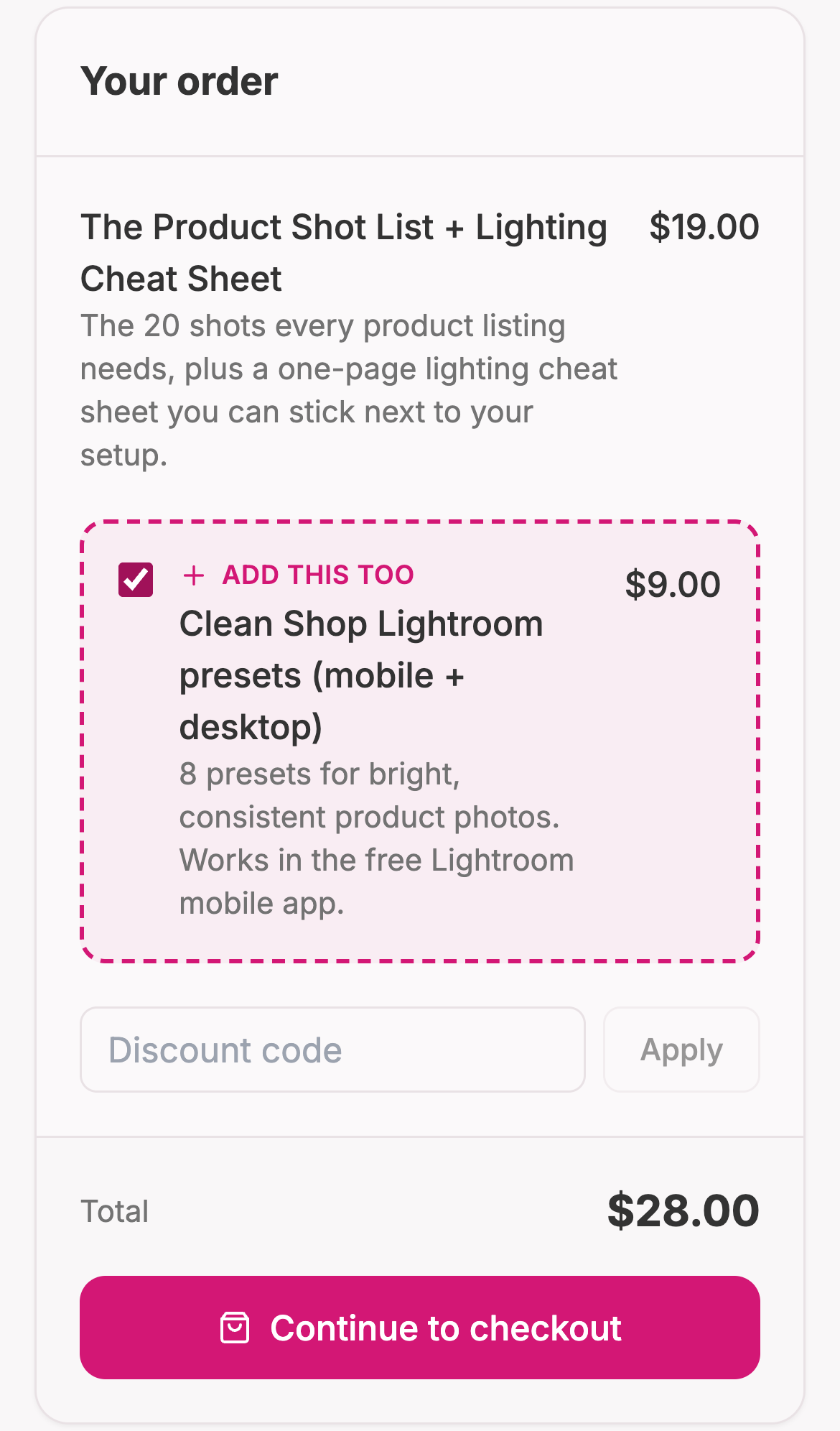
Because the add-on is also a normal product, you can sell it separately too. Some people will buy it on its own, which is fine.
Writing the bump so people say yes
The product title and description do the selling at checkout, so give them a minute of attention:
- Lead with the outcome. "See exactly when you'll be debt-free" beats "Debt tracker spreadsheet."
- Keep it short. One line is plenty.
- Make it feel connected. "Goes perfectly with your budget template" tells them why this is offered now.
- Price it to feel easy. A clear, lower price makes the yes effortless.
Mistakes to avoid
Offering something unrelated. A bump that doesn't connect to the main purchase feels like an ad, and people skip it.
Pricing it too high. If the bump costs more than the main product, it's not a bump anymore.
Overpromising. The bump has to deliver. A disappointing add-on makes people regret the whole purchase.
Setting it and never checking. Look at how many buyers take the bump. If almost nobody does, try a different add-on or a different price.
How to tell if it's working
After a few weeks, look at your Sales page:
- How often is the add-on bought together with the main product?
- Did your average order go up?
- Are you getting refund requests or confused messages? (A sign the bump isn't clear.)
Try changing one thing at a time: a different add-on, a different price, a clearer title. Small tweaks can make a big difference.
The short version
- Pick a product that already sells.
- Ask: what would make it even more useful?
- Create that as a small, cheaper product.
- Attach it as the order bump.
- Write a one-line, outcome-focused title.
- Check the results in a few weeks and adjust.
Order bumps are one of those rare things that are easy to set up, don't annoy anyone, and quietly make you more money from every sale. If you sell digital products, it's worth spending fifteen minutes setting one up today.
Selling digital products already? Add an order bump to your Lynq products in a couple of minutes. New to selling? Start with our guide to selling digital products from your link in bio.