The first time a brand emails you, it's exciting. Then you read the second line: "Could you send over your media kit and rates?"
And if you're like most creators, you don't have one. So you open Canva, search "media kit template", spend three hours moving boxes around, paste in screenshots of your follower count, guess at some prices, export a PDF, and send it with a slightly nervous "let me know what you think!"
Then three months later another brand asks, and the PDF is out of date. Your numbers have changed, you've done new collaborations, and you're not sure if your prices still make sense.
This guide will help you build a media kit that actually works: what to put in it, what brands really look at, how to think about rates, and how to pitch with it. We'll also cover a way to keep it updated without redoing the whole thing every time.
What a media kit is (and what it's for)
A media kit is your one-page pitch to brands. It answers the questions every marketing manager has when they consider working with a creator:
- Who is this person, and what do they make?
- Who is their audience, and is it the audience we want to reach?
- Are they good to work with? Have other brands trusted them?
- What can we buy, and how much does it cost?
That's it. A media kit isn't a portfolio of everything you've ever done, and it isn't your life story. It's a tool to help a busy person say "yes, let's work with them" as quickly as possible.
Keep that in mind and every decision gets easier. If something doesn't help a brand say yes, cut it.
What brands actually look at
Before deciding what to include, it helps to know how brands read media kits. In practice, a marketer usually checks a few things, roughly in this order:
- Fit. Does your content and audience match their product? A skincare brand cares much more about who follows you than how many.
- Audience. Where are your followers located? Which platforms? If a brand only ships to Germany, Austria and Switzerland, an audience that's mostly in the US is less useful, no matter how big it is.
- Proof. Have you worked with brands before? What did that content look like?
- Content quality. They'll click through to your actual content. Your media kit gets them interested; your content closes the deal.
- Price and process. What do you offer, what does it cost, how do they get in touch?
Notice that raw follower count is just one piece. Plenty of smaller creators get brand deals over bigger ones because they're a better fit, have a more engaged audience, or are simply easier to work with.

What to include in your media kit
1. A clear headline
One line that says who you are and what you make. Not "content creator" — be specific.
- "Plant-based recipes for busy weeknights"
- "Budget travel across Europe, with a focus on trains"
- "Honest tech reviews for creatives"
- "Strength training for women over 40"
A brand should understand your niche in five seconds.
2. A short bio
Two or three sentences, written about the brand's interests rather than yours. What do you make, who's it for, and why does your audience trust you?
Good: "I share realistic home workouts for busy parents, with a community of 40k people who actually do them. My audience trusts my recommendations because I only share gear I use myself."
Less good: "Hi! I'm Sam, I'm 29 and I love coffee, my dog and sunsets ☀️"
The second one is lovely for your bio on Instagram. In a media kit it doesn't help anyone decide anything.
3. Location and niches
Where you're based (brands often want local creators) and your main categories. Keep the niches to three or four at most. "Travel, Food, Lifestyle" is clear. Ten categories makes it look like you have no focus.
4. Your platforms and audience size
List each platform you're active on with your handle and follower count. Include the ones that matter, not every account you've ever opened.
Be honest and current. Brands can check, and inflated numbers kill trust immediately. If your Instagram has 12,000 followers, say 12,000, not "15k+".
5. Audience insights
This is where many media kits are weakest, and it's one of the most valuable sections for brands.
Useful audience information includes:
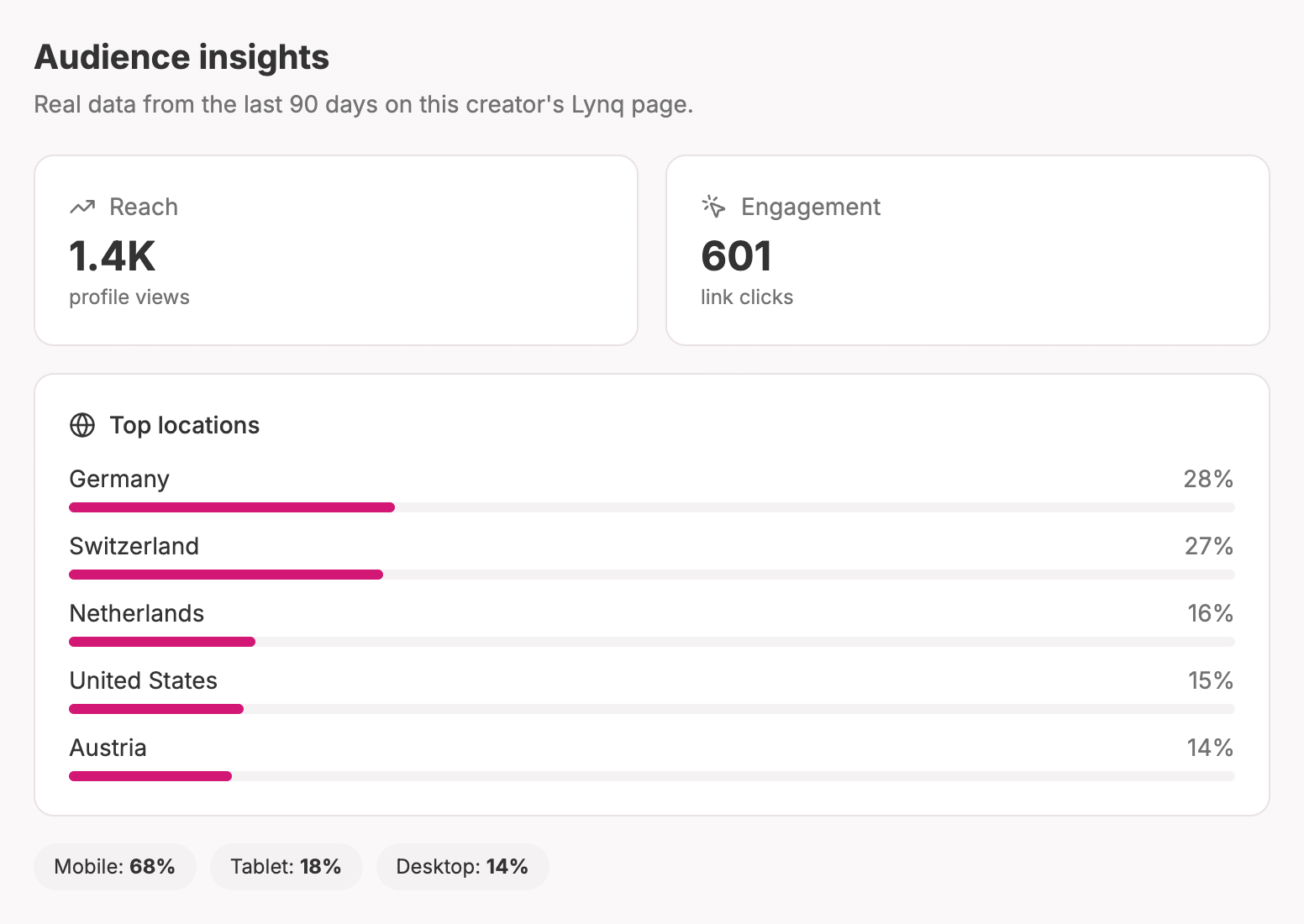
- Top countries or cities where your audience lives
- Devices they use (mostly mobile? lots of desktop?)
- Reach — how many people actually see your content or visit your page
Most creators paste screenshots from their app analytics, which works, but they go out of date quickly. Whatever you use, make sure it's recent. Brands notice when "audience insights" are from two years ago.
6. Past collaborations
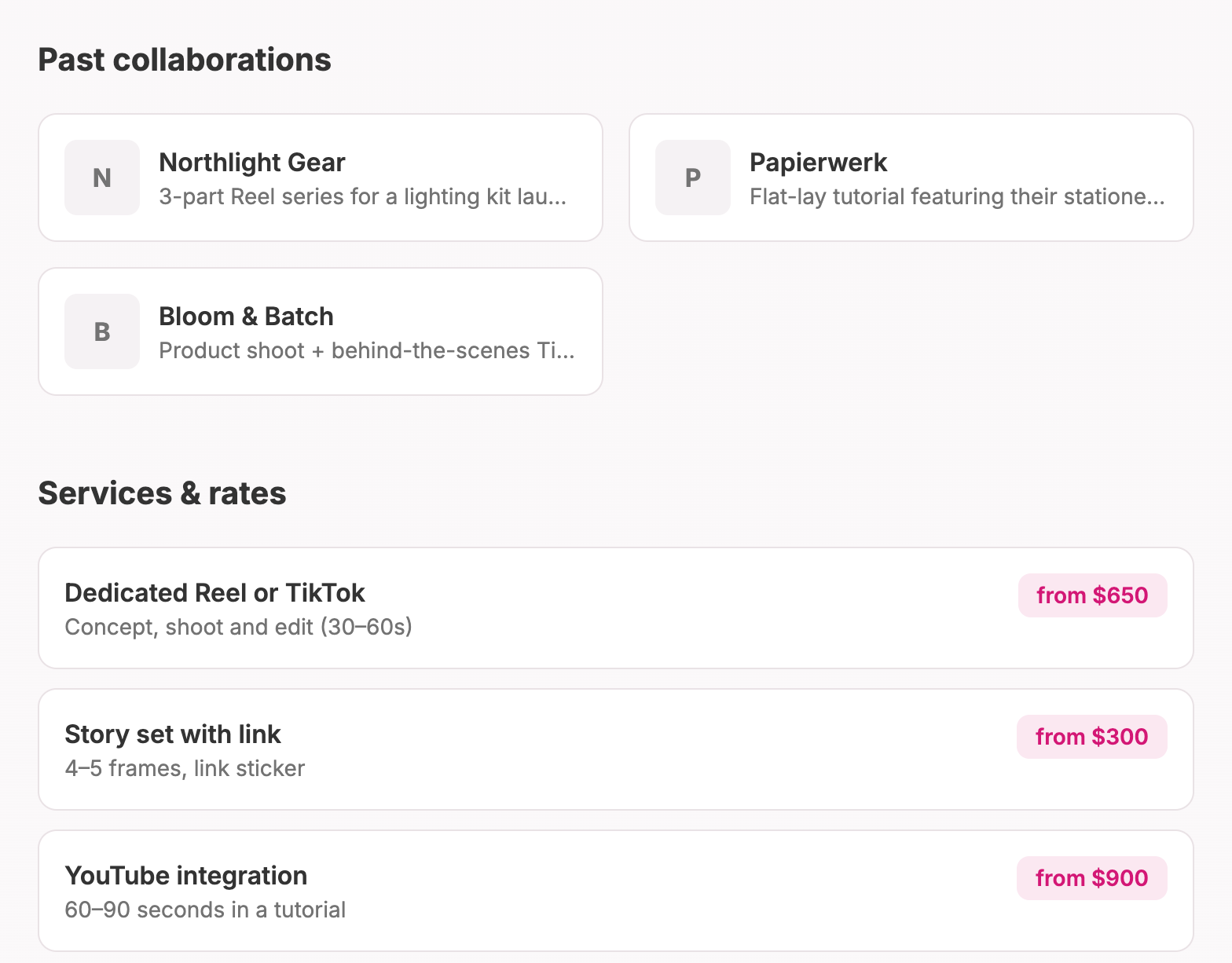
Social proof is powerful. If you've worked with brands before, list them, with logos if you have them, and a line about what you did: "3-part Reel series for a meal-kit launch."
Haven't worked with brands yet? That's fine. You can include:
- Products you've organically featured and that your audience responded to
- Gifted collaborations (be honest that they were gifted)
- Collaborations with other creators
- Content that performed especially well
Everyone starts with zero brand deals. A clear, well-made media kit is often what lands the first one.
7. Your portfolio
Show your best work. Three to six pieces is plenty: your strongest videos, best-performing posts, and anything that looks like what a brand might want from you.
If you've done sponsored content, include it — it's exactly what brands want to see. If not, choose pieces that show your style and how you'd feature a product naturally.
8. Services and rates
This is the part creators are most nervous about. We'll talk about pricing in a moment, but in terms of layout, list your main offers with a starting price:
- Dedicated Reel or TikTok — from $X
- Story set (3–5 frames with link) — from $X
- YouTube integration (60–90 seconds) — from $X
- Bundle (Reel + stories) — from $X
- Usage rights / whitelisting — on request
"From" prices are your friend. They give the brand a rough idea of the budget while leaving room to adjust for the specifics of each deal.
9. Contact information
An email address. Make it easy. If brands have to dig for how to contact you, some won't bother.
How to set your rates
There's no universal price list for creators, and anyone who claims there is is oversimplifying. Rates depend on your niche, your audience, the platform, the format, the usage rights and your engagement.
That said, here's a practical way to get to numbers you feel good about:
Start with a baseline. Many creators start around a rough rule of thumb based on followers per platform, then adjust. Lots of free calculators exist online; use them as a starting point, not as truth.
Adjust for engagement and niche. A highly engaged audience in a niche with strong buying intent (finance, tech, beauty, parenting) is worth more than a large but passive audience. If people regularly buy what you recommend, that's worth a premium.
Account for the work. A sponsored Reel isn't "one post." It's concept, scripting, filming, editing, revisions and posting. Price the whole job.
Charge separately for usage rights. If a brand wants to use your content in their own ads, that's a separate (and significant) fee. Your content is promoting them to audiences far beyond yours.
Leave room to negotiate. Brands often counter. Starting slightly higher gives you room to meet in the middle without undercutting yourself.
Raise your rates over time. If every brand says yes immediately, you're probably too cheap.
And one more thing: don't work for "exposure" unless you genuinely want to. Gifted collaborations can be great for building a portfolio early on. But if a brand has a budget for ads, it has a budget for creators.
How to pitch brands with your media kit
Don't wait for brands to find you. Many good collaborations start with the creator reaching out.
Make a shortlist. Write down 10–20 brands you already use and love, and that fit your audience. Authenticity matters, and your audience can tell.
Find the right person. Look for a partnerships, influencer or marketing contact. LinkedIn and the brand's website often help. A generic "info@" address works if you can't find anything better.
Write a short, specific email. Something like:
Subject: Collaboration idea — [your niche] x [brand]
Hi [name],
I'm [name], I create [what you make] for [who your audience is] — mostly on [platforms]. I've been using [product] for [time] and my audience keeps asking about it.
I'd love to create [specific idea — e.g. a Reel showing how I use it in my morning routine] for your [launch / season / campaign].
My media kit with audience stats, past work and rates is here: [link]
Would that be interesting for you?
[name]
Lead with an idea, not a request. "I'd love to work with you" is easy to ignore. "Here's a specific piece of content I'd make for you" is much easier to say yes to.
Follow up once. If you hear nothing after a week, send one friendly follow-up. Then move on.
Why a link beats a PDF
Here's the thing about PDF media kits: they're out of date the moment you send them. Your followers change, you do new collaborations, your rates go up. Updating means opening the design file, editing, exporting and re-sending.
A media kit as a web page solves that. You send one link, and it always shows the latest version. You can put it in your email signature, your pitch template and your Instagram contact options.
On Lynq, the media kit is a Pro feature that does exactly this. You fill in your headline, location, contact email and niches; add your platforms and follower counts, your past collaborations and your services with rates; and build a portfolio from YouTube or TikTok links. Then you publish it, and it lives at your own media kit link. It stays private from search engines, so it's for the brands you send it to, not random visitors.
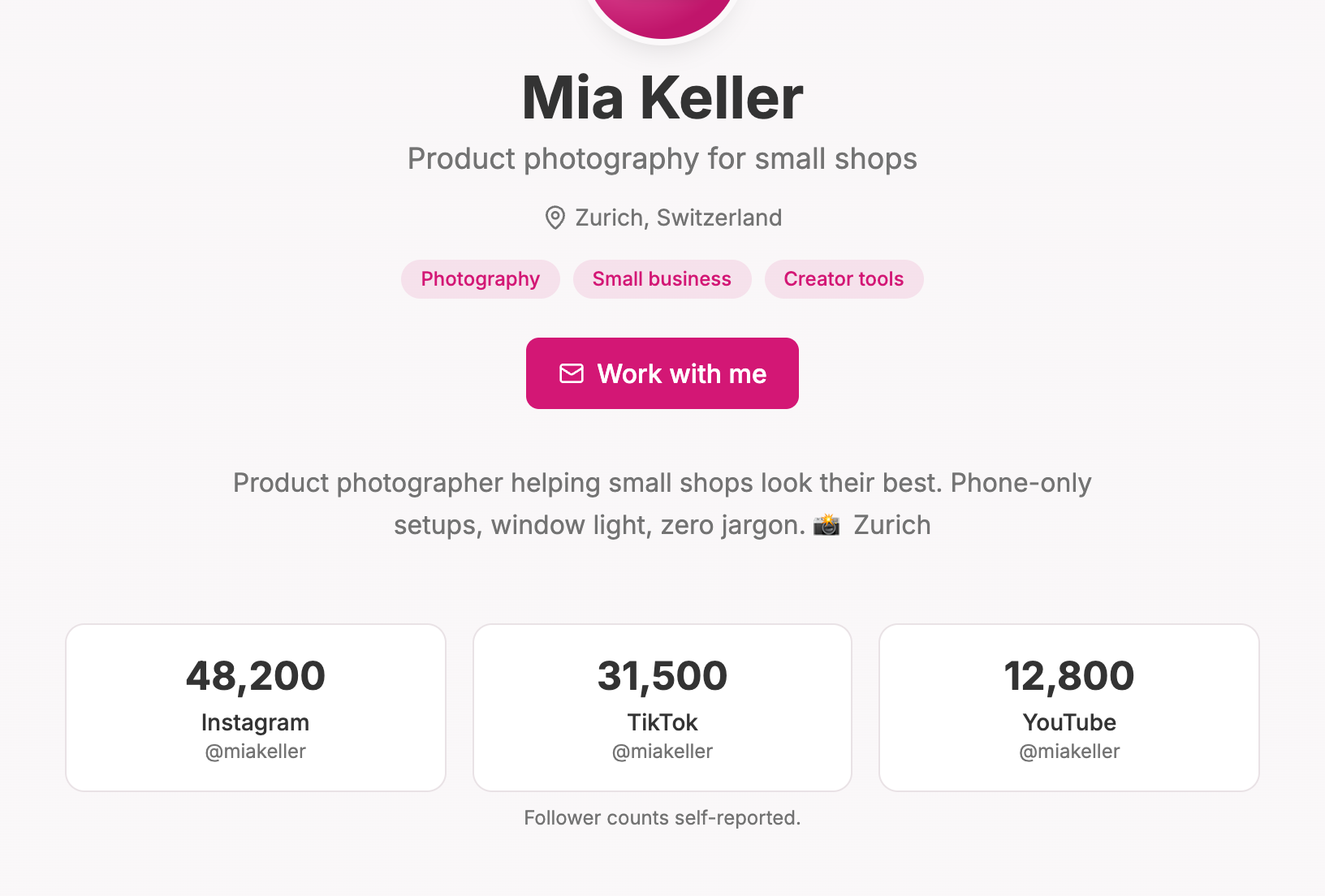
There's also an optional audience insights section, filled in automatically from your Lynq page traffic: where your visitors come from, what devices they use, and how many people your page reaches. It only appears once there's enough data to be meaningful, and you can switch it off. It's one less screenshot to keep updated, and brands like seeing real data rather than numbers typed by hand.
Common media kit mistakes
Too much design, too little information. A beautiful media kit that doesn't say what you offer or how to contact you is just decoration.
Old numbers. Update it at least every couple of months, or use something that updates itself.
No prices. Some creators prefer "rates on request", and that's a valid choice. But listing starting prices filters out brands with tiny budgets and speeds everything up.
Too long. One page (or one screen, scrolled) is enough. If it takes ten minutes to read, it won't be read.
Generic copy. "Passionate content creator who loves connecting with my audience" says nothing. Be specific about your niche and your audience.
Fake or inflated stats. It's never worth it. One awkward discovery and you've lost that brand forever.
Your media kit checklist
- A one-line headline that names your niche
- A 2–3 sentence bio focused on your audience and why they trust you
- Location and 3–4 niches
- Platforms, handles and honest follower counts
- Audience insights (countries, devices, reach) — recent
- Past collaborations or your best organic product features
- 3–6 portfolio pieces
- Services with "from" prices
- A clear contact email
- A shareable link you can update anytime
Want a media kit that stays up to date by itself? Create your Lynq page and upgrade to Pro to build your media kit, with automatic audience insights from your page traffic.