Here's a story that happens to creators all the time.
You get an idea for a product. A course, a template pack, an ebook, a community. You're excited. You spend weeks, sometimes months, building it. You polish every detail. You launch it with a big post.
And then... a handful of sales. Maybe none. Not because the product is bad, but because you built it before finding out if people wanted that specific thing, at that price, right now.
There's a better way: find out first. Put up a waitlist, see who signs up, learn from them, and then build. If lots of people join, you build with confidence and launch to a crowd. If nobody does, you've saved yourself months of work.
This guide explains how.
Why a waitlist beats "just launching"
A waitlist does three jobs at once:
1. It tests demand. Signing up takes a few seconds, but it's still an action. Someone who gives you their email is telling you, "Yes, I want this." That's much more reliable than people saying "Oh, that sounds cool!" in comments.
2. It builds an audience for launch day. Instead of launching to a cold feed, you launch to a list of people who've raised their hand. They're far more likely to buy.
3. It lets you build with your future customers. You can email the people on your list, ask what they want, test names and prices. You end up building what they'll actually buy, not what you assumed they wanted.
Step 1: Describe the thing before it exists
You don't need the product to start a waitlist. You need a clear description of what it will be.
Write down:
- What it is. "A 4-week online course on..." / "A Notion template for..." / "A private community for..."
- Who it's for. Be specific. "For freelance illustrators who struggle to price their work."
- What it will help them do. The result, not the features.
- Roughly when it's coming. "Launching in March" or "Coming this spring." A rough date creates urgency without boxing you in.
This becomes the text of your waitlist page. Keep it short and clear. One headline, a couple of sentences, and a signup box.
Tip: If you can, add a sneak peek. A screenshot of a draft template, a clip from a lesson you've recorded, a mood board. Even rough work makes it feel real.
Step 2: Set up the waitlist page
Your waitlist page needs only a few things:
- A clear name and headline
- A short description of what's coming and who it's for
- An email signup
- Ideally, a sense that others are signing up too
On Lynq, you create waitlists from the Waitlists section of your dashboard. Each one gets its own public page with your name, description and accent colour, plus a signup form. You can show how many people have signed up already — social proof matters, and "347 people are waiting" makes the next person much more likely to join.
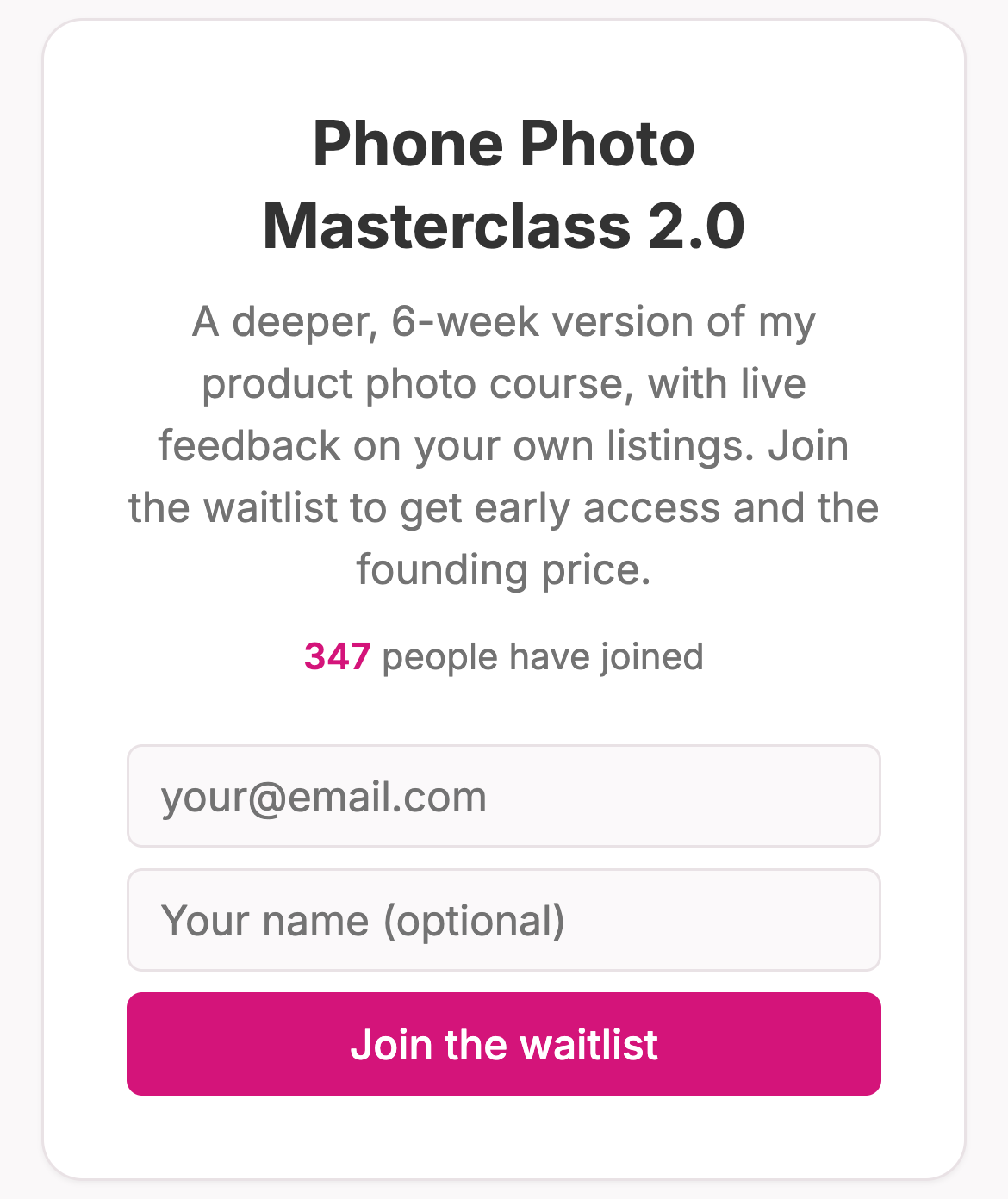
Every signup also lands in your Lynq subscriber list, so these people stay reachable after the launch too.
Step 3: Let your waitlist grow itself with referrals
Here's where waitlists get really powerful: give people a reason to share it.
When referrals are switched on, everyone who joins your Lynq waitlist gets their own personal link. Every friend who signs up through that link moves them up the list. The list is ranked by referrals, then by signup time, so the most enthusiastic people rise to the top.

Why does this work? Because people love being early, and because "jump the line" turns every signup into a potential promoter.
To make referrals even more effective, give the front of the line a real reward:
- Early access — the first 50 get in a week before everyone else
- A founding-member discount — the top of the list gets the best price
- A bonus — an extra template, a free 1:1 session, a lifetime deal
Tell people clearly what they get for being near the top, and remind them of their link in your emails.
Step 4: Drive people to the waitlist
A waitlist with no traffic doesn't tell you anything. You need to put it in front of people.
- Put it at the top of your link in bio. Add the waitlist as a link with a clear label: "Join the waitlist for [product] →".
- Talk about it in your content. Share why you're making it, what problem it solves, and behind-the-scenes progress.
- Use stories. Polls ("Would you want X or Y?") and question boxes ("What's your biggest struggle with...?") create engagement and point people to the waitlist.
- Email your existing list. If you have subscribers, they're your warmest audience.
- Reply to related comments and DMs. When someone asks about the topic, tell them it's coming and share the waitlist link.
Step 5: Read the signals
After a couple of weeks, look at the numbers and ask: is there enough demand?
There's no universal magic number, but here's a useful way to think about it:
- Not everyone on a waitlist buys. A meaningful but small share of signups typically become buyers on launch day, and that share depends heavily on how warm your audience is and how well you nurture the list.
- So work backwards: "If only a small fraction of these people buy at my planned price, is that worth building?"
If the answer is yes, build it. If it's borderline, keep collecting signups and keep talking to people. If almost nobody signs up despite you promoting it properly, that's valuable information too. Maybe the idea needs a different angle, a different audience, or a different format.
Don't just look at the number — look at who signed up. Are they the people you had in mind? If you expected beginners but lots of advanced people joined, that changes what you should build.
Step 6: Talk to the people on the list
This is the step most people skip, and it's the most valuable one.
Email your waitlist. Something like:
Hey! Thanks so much for joining the waitlist for [product]. I'm building it right now and I want to make sure it's actually useful for you.
Can you reply and tell me: what's the one thing you're hoping it'll help you with?
The replies will tell you:
- The exact problems people want solved
- The words they use (perfect for your sales page later)
- What to include, and what to leave out
- Whether your planned price feels right
Even five thoughtful replies can change what you build for the better.
Step 7 (optional): Pre-sell
If you want the strongest possible validation, ask people to pay before you build.
Offer a pre-sale or founding price to the waitlist: "Pre-order now at 40% off. It launches on [date], and you'll get it first." People who pay are the clearest possible signal of demand. And the money can fund the time you spend building.
Be honest about the timeline and deliver what you promise. If the pre-sale doesn't reach a level that makes building worthwhile, refund everyone with a thank-you. People respect that.
Step 8: Launch to the waitlist first
When it's ready, your waitlist gets it before anyone else:
- A few days before: "It's almost here. You'll get access before everyone else on [date]."
- Launch day: Email the waitlist first, with any early-access price or bonus you promised. Give them a head start — a day or a few hours.
- Then go public: Announce it to everyone else on your channels.
- Close the loop: Mark the waitlist as launched and point new visitors to the product.
The waitlist people are your most enthusiastic customers. Treat them like VIPs and they'll often become your best promoters.
Common mistakes
Waiting until it's built. The whole point is to start the waitlist before you build. The earlier you start, the more you learn.
A vague description. "Something exciting is coming!" doesn't get signups. Say what it is and who it's for.
Not promoting it. A waitlist only works if people see it. Mention it often.
Never emailing the list. If you don't talk to your waitlist for three months, they'll forget why they signed up. Send updates every couple of weeks.
Ignoring a weak result. If nobody signs up, don't build it anyway "to see what happens." Change the idea and try again.
The short version
- Describe the product clearly, before building it.
- Create a waitlist page with a signup form.
- Turn on referrals and reward the top of the list.
- Put it at the top of your link in bio and talk about it.
- Look at the numbers and at who signed up.
- Email the list and ask what they want.
- Optionally pre-sell to the strongest supporters.
- Launch to the waitlist first.
Building something nobody wants is one of the most common and most painful mistakes creators make. A waitlist turns guesswork into evidence, and gives you a crowd waiting at the door when you open it.
Have an idea you want to test? Create your Lynq page, set up a waitlist with referrals in a few minutes, and find out who's waiting.