At some point, every creator with expertise hits the same wall. People want your help, one-on-one. They send long DMs explaining their situation. They ask if you can "just take a quick look." They offer to "hop on a call sometime."
And for a while you say yes for free, because it feels good to help. Then your inbox becomes a second job and you start dreading opening it.
The fix isn't to stop helping. It's to put a price and a booking link on your time, so the people who really want your help can get it — properly, on a schedule that works for you — and everyone else gets a polite, automatic answer.

This guide walks through the whole thing: what to offer, how to price it, setting up your availability, taking payment before the call, and running sessions that turn one booking into many. It works for coaches, consultants, designers, fitness trainers, tutors, stylists, musicians, career advisors, nutrition and wellness pros — anyone whose knowledge is worth sitting down with.
Why selling your time is the best first offer
Before courses, before digital products, before memberships, 1:1 calls are usually the easiest thing to start selling. A few reasons:
- There's nothing to build. No videos to record, no files to design. Your product is a conversation.
- The price can be high from day one. An hour of focused, personal help is worth more to someone than a $20 ebook, and they know it.
- You learn what people actually need. Every call teaches you what your audience struggles with, in their own words. That's how you find your future course or product.
- It filters out time-wasters. Free calls attract people who are "just curious." Paid calls attract people who are ready to act.
The obvious downside: you only have so many hours. That's fine. Calls are a starting point, and they'll fund and inform everything you build next.
Step 1: Decide what you're actually selling
"Book a call with me" is vague. Vague offers don't sell well, because people can't tell if it's for them or what they'll walk away with.
Instead, make each session a specific thing with a specific outcome. Some examples:
- Portfolio review (45 min) — "I'll go through your design portfolio live and tell you exactly what to change to get more interviews."
- Training plan session (60 min) — "We'll build your next 8 weeks of training around your schedule and your goal race."
- Instagram audit (30 min) — "I'll look at your profile, your last 20 posts and your stats, and give you the three changes that will make the biggest difference."
- Song feedback (30 min) — "Send me your demo beforehand. We'll go through arrangement, mix and vocals together."
- Career strategy call (60 min) — "For people stuck between two job offers, or deciding whether to switch fields."
Notice what each one does: it names the session, says how long it is, and describes the result. Someone reading it can decide in five seconds whether they need it.
Offer two or three options, not ten
A good starting lineup is usually:
- A short, lower-priced session (15–30 minutes) — a quick question, a fast review, a "help me get unstuck" call. This is the easy yes.
- Your main session (45–60 minutes) — the deep one, where you actually solve something.
- Optionally, a free intro call (15 minutes) — only if you sell larger packages or ongoing coaching and need to check fit first.
More options than that tends to cause decision paralysis. You can always add more later.
Step 2: Price it with confidence
Pricing your time is uncomfortable for almost everyone. Here's a way to think about it that helps.
Start from the value, not from an hourly wage. If your session helps someone land a job, fix their training before an injury, or stop wasting money on ads that don't work, that result is worth far more than "an hour of your time." Price somewhere between what feels comfortable and what the result is worth to the client.
Some rough ranges creators commonly use:
- 15–30 minute quick sessions: often $25–$100
- 45–60 minute deep sessions: often $75–$300
- Specialised professional expertise (legal, finance, senior tech, executive coaching): often much more
Where you land depends on your field, your experience and your audience. A few practical tips:
- Charge more than feels comfortable. If you get booked out quickly, that's the market telling you you're too cheap. Raise the price for new bookings.
- Don't do free calls for things you could charge for. If you offer a free "discovery call", it should be short and purely about fit, not a free version of your paid session.
- Your price shapes who books. Higher prices tend to bring clients who show up prepared and actually implement what you tell them.
Step 3: Set your availability (and protect your time)
This is the part that turns "DM me to schedule" chaos into something calm.
Decide in advance when you're willing to take calls — not "whenever someone asks", but specific windows. For example:
- Tuesdays and Thursdays, 10:00–13:00
- Wednesday evenings, 18:00–20:00
That's it. Your week stays yours outside those windows.
On Lynq, you set this once in the Booking section of your dashboard as weekly availability — one or more time windows for each day of the week, in your timezone. Lynq then turns those windows into bookable slots based on the length of each service.
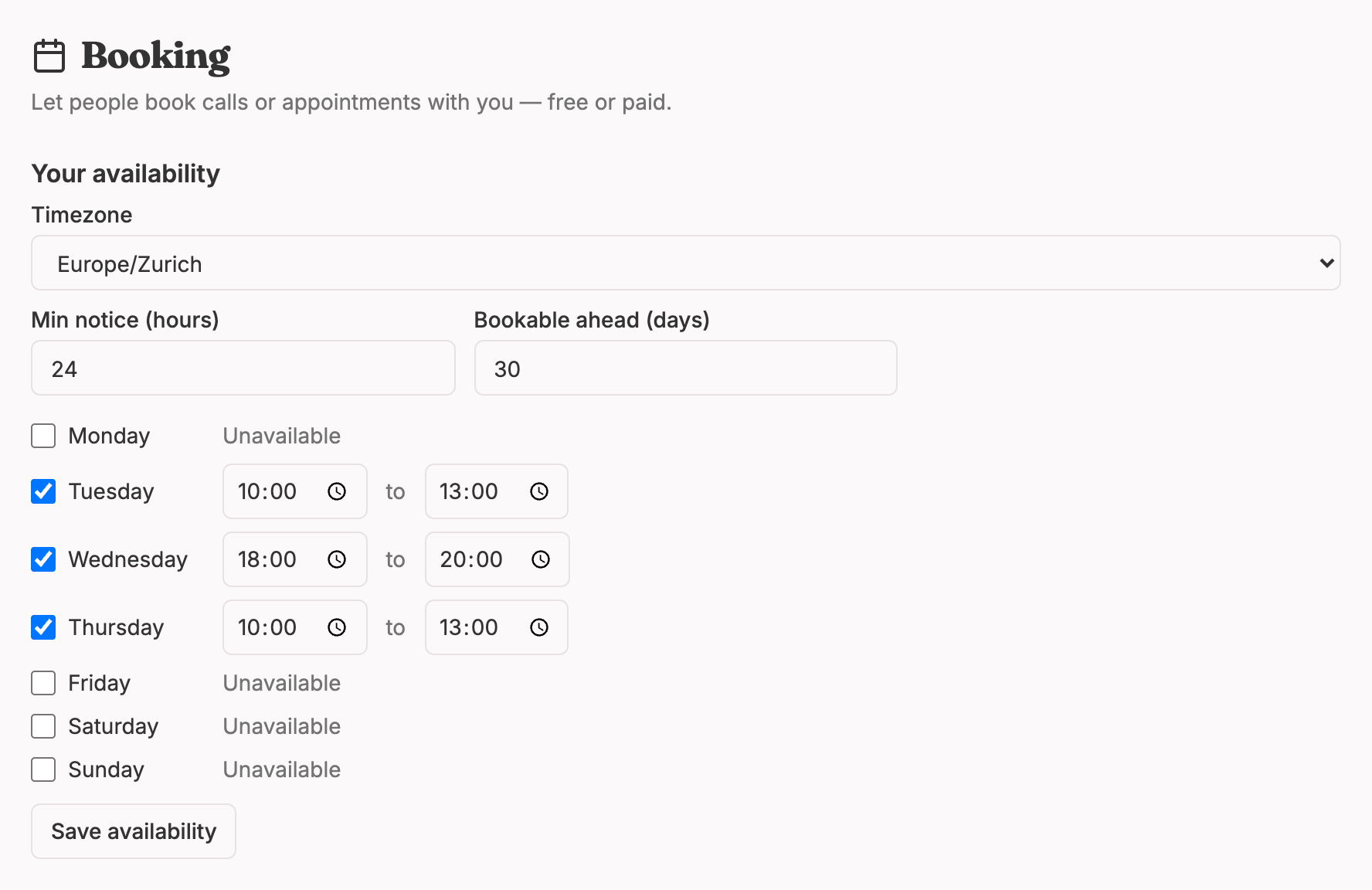
Two settings matter more than people expect:
- Minimum notice. How soon before a slot can someone book it? The default is 12 hours, so nobody books a call that starts in 20 minutes while you're in the shower. If you need time to prep (reviewing a portfolio, reading a document), set it to 24 or 48 hours.
- Booking window. How far ahead can people book? The default is 30 days. Shorter windows keep your schedule flexible; longer windows suit people who book well in advance.
And a few habits that save a lot of stress:
- Leave gaps. If you set one long window, people can book you back-to-back for three hours straight. If you need breaks, split your availability into smaller windows.
- Don't open more hours than you want to work. You can always add more later. Taking them away after people get used to them is harder.
- Update it when life happens. Going on holiday? Remove those days from your availability before you go. Lynq doesn't sync with Google Calendar yet, so your availability is the single source of truth. Keep it honest.
A note about time zones
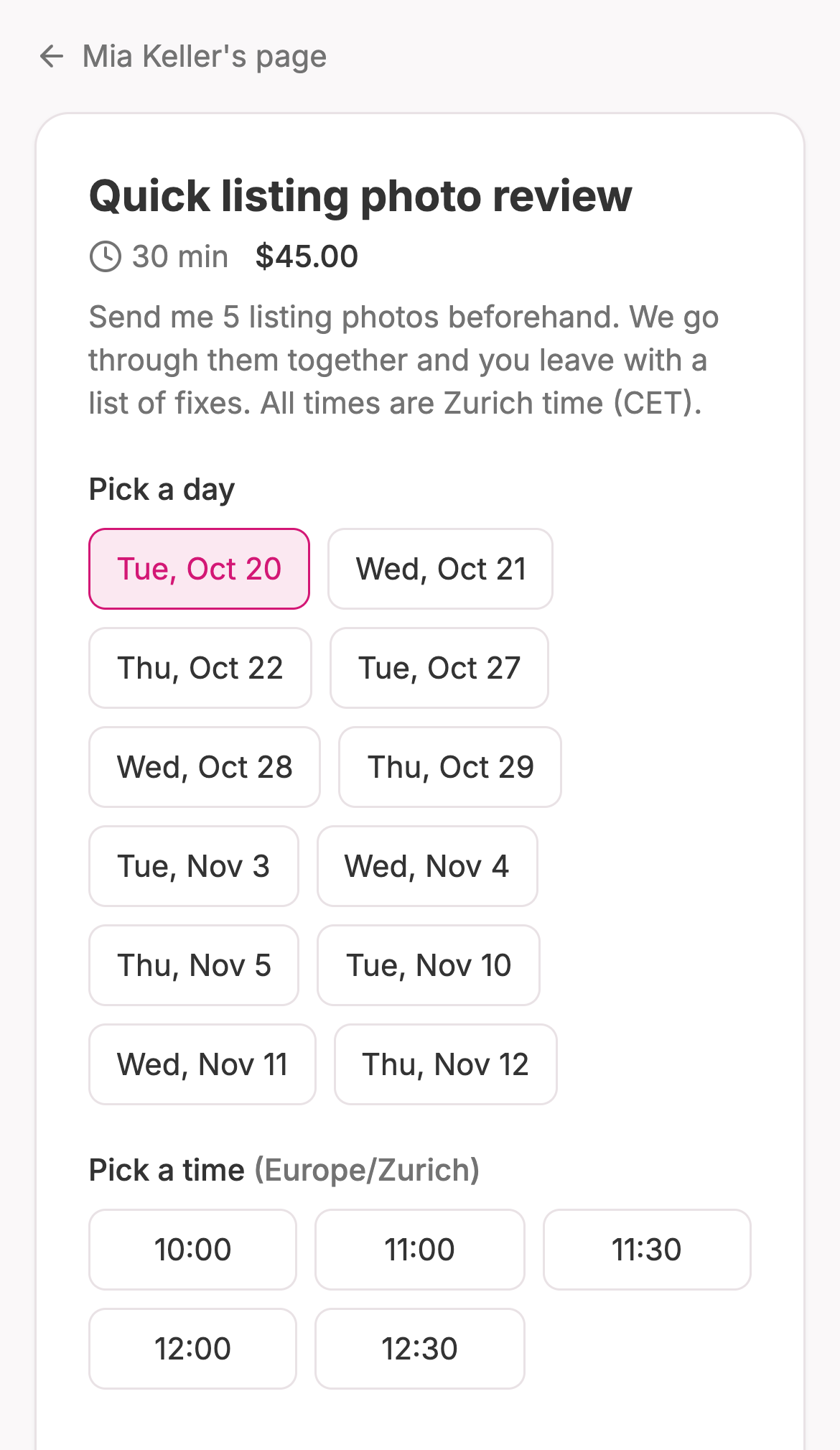
Your audience is probably spread across time zones. Lynq shows your slots in your timezone, so it's worth making that obvious. Put it right in the service description: "All times are in Zurich time (CET)." People are used to converting, and it prevents the classic "I thought it was 3pm my time" no-show.
Step 4: Write the service description
Each service gets a title, a description, a duration and a price. The description is doing your selling, so give it a little care. Cover:
- Who it's for. "For freelance designers with at least a few projects in their portfolio."
- What happens in the session. "We'll screen-share and go through your portfolio piece by piece."
- What they walk away with. "A prioritised list of changes and a recording of the call."
- How to prepare. "Send me your portfolio link at least 24 hours before."
- Practical details. Timezone, how the call happens, your rescheduling policy.
Then add the location — the Zoom, Google Meet or Whereby link, a phone number, or a physical address if you meet in person. Lynq keeps this private and sends it in the confirmation email after someone books, so you're not posting your meeting room link publicly.
Tip: Use a personal meeting room link that doesn't change (most video tools have one). Then the same link works for every booking and you never have to send it manually.
Step 5: Get paid before the call, not after
This is the most important part of the whole guide.
Take payment when the booking is made. Not "I'll send an invoice after." Not "pay me on PayPal sometime." Up front.
Why it matters:
- No-shows drop dramatically. People show up for things they've paid for.
- You never chase money. No awkward follow-ups, no invoices sitting unpaid for weeks.
- It sets the tone. Paying up front signals this is a real, professional session.
On Lynq, paid bookings go through Stripe checkout: the client picks a slot, pays with card, Apple Pay or Google Pay, and the booking is confirmed straight away. The money goes directly to your own Stripe account. (You'll need to connect payouts once before you can charge for sessions. Free bookings work without that.)
Lynq also protects you from double-booking. Once a slot is taken, it's gone from the calendar, so two people can't grab the same time.
What happens after someone books
Both of you get a confirmation email with the date, time and session details. The client's email includes the meeting location. You'll also see upcoming bookings on your Sales page, and every client is added to your subscriber list automatically. That last part is easy to overlook, but it's gold. People who've paid for your time are your warmest possible audience for whatever you launch next.
Step 6: Put the booking link where people will see it
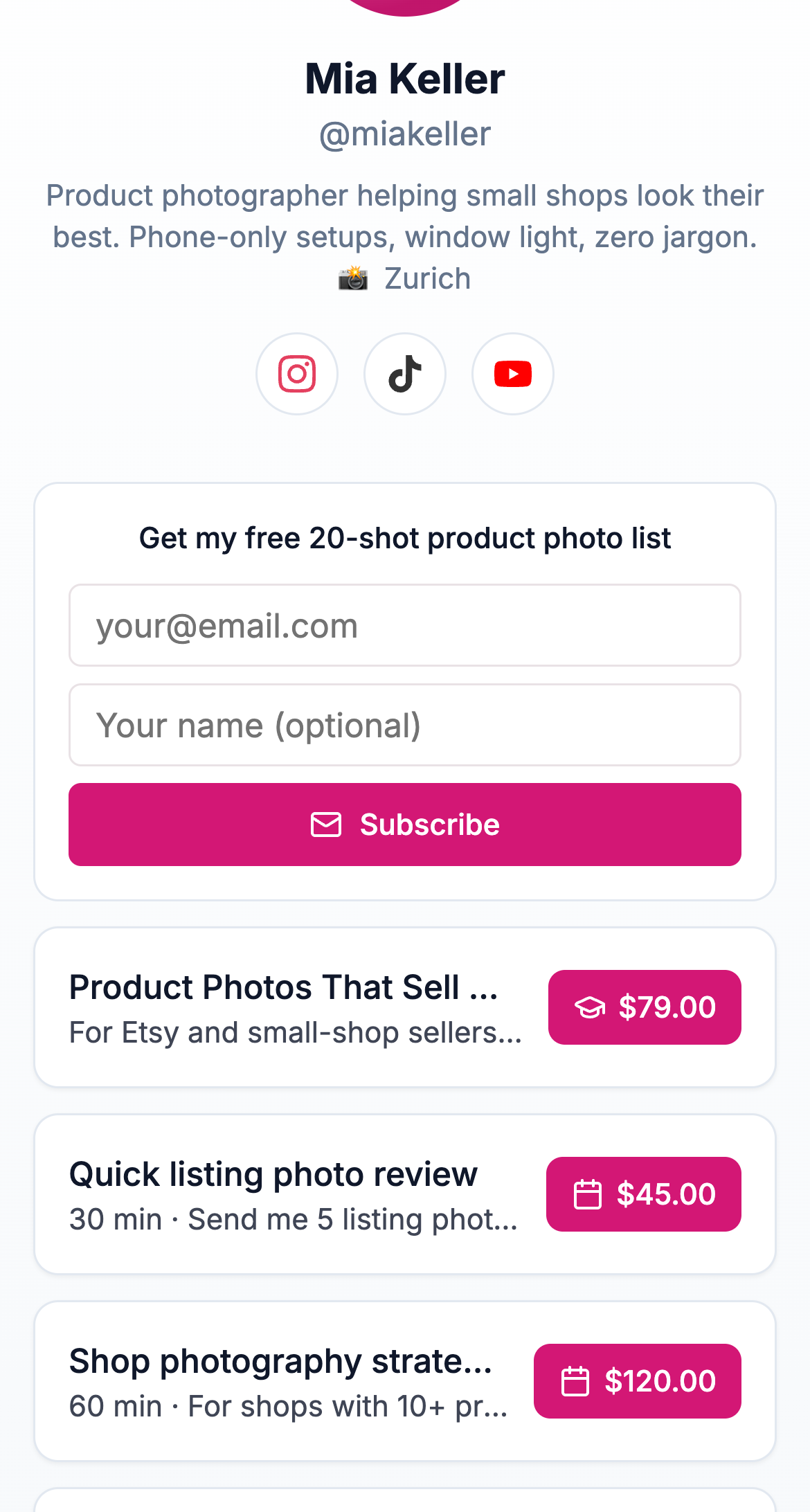
Your link in bio is where this all comes together. Instead of "DM me for coaching", people tap your link, see your services, pick a time and pay — without a single message going back and forth.
On your Lynq page, your services appear as their own section. Drag it high up the page if calls are your main offer right now.
Then point people to it:
- Change your bio text. "1:1 portfolio reviews ↓" is clearer than a generic tagline.
- Use a pinned post or highlight explaining what a session looks like and who it's for.
- Reply to DMs with the link. When someone asks "can I pick your brain?", you now have a friendly, easy answer: "I'd love to help! I do 30-minute sessions for exactly this — you can grab a time here."
- Mention it in your content. When you post about a common problem, end with "If you want me to look at yours specifically, I do 1:1 reviews — link in bio."
That DM reply is honestly the biggest win of the whole setup. It turns an awkward "I can't help everyone for free" moment into a clear, kind next step.
Step 7: Run sessions people rave about
Getting the booking is half of it. The other half is making the session so good that clients book again and tell their friends.
Before the call
- Send a short prep message if needed: "Excited for Thursday! If you can, send me your three biggest questions beforehand."
- Actually read what they send. Showing up prepared is the single biggest quality signal.
During the call
- Start by confirming the goal: "By the end of this hour, what would make this feel worth it for you?"
- Keep an eye on the time and leave five minutes at the end for next steps.
- Be specific. "Your portfolio needs work" is useless. "Move this project first, cut these two, and rewrite your intro to say who you design for" is gold.
After the call
- Send a short follow-up email the same day: the key takeaways, any links you mentioned, and the recording if you made one.
- Include a soft next step: a follow-up session, a related product, or your newsletter.
Doing these simple things consistently puts you ahead of most people selling their time.
Handling cancellations, rescheduling and refunds
Things come up. Decide your policy before they do, and write it in the service description so nobody is surprised:
- Rescheduling: "Need to move your session? Email me at least 24 hours before and we'll find a new time."
- Cancellations: "Full refund if you cancel more than 24 hours before. Within 24 hours, I'll reschedule once."
- No-shows: "If you miss the session without notice, it's not refundable."
Clients ask you to cancel or reschedule by email, which keeps you in the loop. When you need to cancel, open your Sales page in Lynq and hit Cancel & refund next to the booking. Paid sessions are refunded in full, your client gets an email (with a personal note if you add one, plus a link to book a new time), and the slot opens up again for someone else.
Be generous with genuine emergencies. A kind reschedule turns a stressed client into a loyal one.
Growing beyond 1:1
Once your calendar fills up, you have options:
- Raise your prices. A full calendar is a sign of demand.
- Turn common questions into products. If you explain the same thing on every call, make it a guide or a short course and point people there first.
- Offer a membership or group format. Answer questions for many people at once, at a lower price per person.
- Package sessions. "Three sessions over six weeks" lets you go deeper with each client and gives you more predictable income.
Calls are a great foundation. Many creators keep a few 1:1 slots open forever, even after launching other products, because nothing beats the insight you get from talking directly to the people you serve.
Quick checklist
- Define 2–3 specific sessions with clear outcomes
- Price on value, slightly above your comfort zone
- Set your weekly availability with breaks built in
- Choose a minimum notice and booking window
- Write descriptions with who, what, outcome, prep and timezone
- Add your permanent meeting link as the location
- Connect payouts and charge up front
- Put your policy for cancellations and rescheduling in writing
- Move the booking section near the top of your page
- Update your bio and start replying to "pick your brain" DMs with the link
Ready to stop scheduling calls in your DMs? Create your free Lynq page, add your first service, and start taking paid bookings from your bio today. On Pro, you keep 100% of every booking (minus Stripe's processing fee).