There's a myth that memberships are only for big creators. That you need 100,000 followers before anyone will pay you every month.
It's not true, and the math shows why. If you have 2,000 followers and 2% of them join a $7-a-month membership, that's 40 members and $280 a month. Grow that to 100 members at $10 and you're at $1,000 every single month, before you've sold anything else. Not life-changing on its own, maybe, but recurring, predictable, and growing. That's the magic of memberships: you don't start from zero every month.

This guide is about launching one properly. Not a vague "support me" button, but a membership people actually want to join and stay in. We'll cover what to offer, how to price it, where to deliver the perks, how to launch, and the part most guides skip: how to keep members from cancelling.
What a membership actually is
A membership is a simple deal: someone pays you a recurring amount, and in return they get ongoing access to something.
That "something" can take many forms:
- Exclusive content — bonus videos, deeper tutorials, behind-the-scenes, early access
- Community — a private Discord, Telegram, WhatsApp or Circle group with you and other members
- Access to you — monthly live Q&As, a members-only thread where you answer questions
- Resources — a growing library of templates, presets, sheet music, workout plans, recipes
- Recognition and support — the "patron" model, where people mainly pay because they love what you do and want to support it
The best memberships usually combine two or three of these. But the core question is always the same: what will make a member feel, every month, that this was worth it?
Step 1: Figure out what people would pay for every month
A one-time product solves one problem once. A membership has to deliver value over and over. That's a different question, and it's worth thinking about carefully.
Look at what your audience already comes back to you for:
- Do they ask for more of something? "Can you do more of these?" "When's the next one?" That's ongoing demand.
- Do they want to talk to each other? If your comments are full of people helping each other, a community could be the core of your membership.
- Do they struggle with something long-term? Fitness, learning a language, growing a business, learning an instrument. Long journeys suit memberships, because people want support along the way.
- Do they just love what you make? If people regularly say "how can I support you?", a simple supporter tier is a perfectly valid membership.
Some membership ideas by niche
- Fitness coach: a new 4-week training block every month, plus a members-only chat for check-ins
- Illustrator: monthly brushes and process videos, plus a vote on what you draw next
- Language teacher: weekly vocabulary packs and a monthly live conversation class
- Musician: early access to new songs, stems for remixers, a monthly listening session
- Cook: a monthly meal-plan PDF with shopping lists, plus a community for sharing results
- Business or career creator: monthly teardown videos, templates, and a Q&A call
- Podcaster: ad-free episodes, bonus episodes, and a private community
Notice the pattern: something new arrives regularly, and there's usually some way for members to interact with you or each other.
Step 2: Design your tiers
You can absolutely start with one tier. In fact, for your first membership, one well-thought-out tier is usually better than three rushed ones.
If you do want multiple tiers, a common structure looks like this:
- Supporter (e.g. $3–5/month): for people who just want to support you. A thank-you, maybe a members-only update each month, maybe early access to your public content.
- Member (e.g. $8–15/month): your main tier. The core content and the community.
- Inner circle (e.g. $25–50+/month): more access to you. Monthly group calls, feedback on their work, priority answers. Keep this one limited so it stays manageable.
A few principles:
- Each tier should clearly be worth more than the one below. "Everything in Member, plus..." makes upgrades easy to understand.
- Make the main tier the obvious choice. Most people will pick the middle option if it's clearly the best value.
- Don't promise what you can't deliver every month. "A new video every week" sounds great until month three, when you're exhausted. Promise what you can sustain, then over-deliver.
Monthly or yearly?
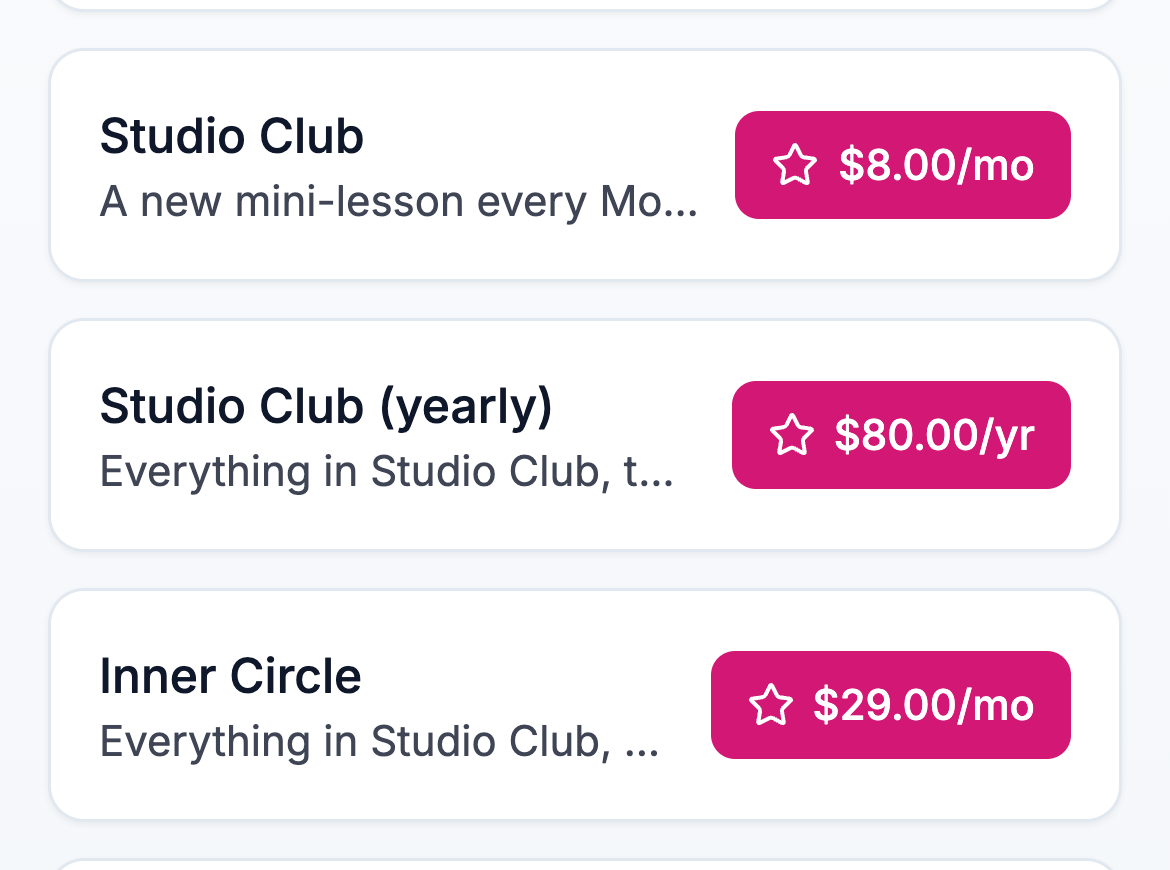
Offer both if you can. On Lynq, each membership tier can be billed monthly or yearly.
A yearly option is great for two reasons. Members who are committed get a better deal, often around two months free. And you get cash up front plus a member who's around for a full year, which smooths out the ups and downs of monthly churn.
A typical setup: $10/month or $100/year.
Step 3: Price it (lower than a course, higher than you think)
Membership pricing works differently from one-time products, because people evaluate it as an ongoing cost. Some guidance:
- Compare it to everyday subscriptions. People think of memberships next to streaming services and apps. $5–15 a month is an easy decision for most people, if the value is clear.
- Price on what they get, not how much time you spend. If your monthly meal plan saves someone two hours of planning every week and money on groceries, $9 is a bargain.
- Start a little higher than feels comfortable. It's easier to add a cheaper tier later than to raise prices on existing members.
- Reward early members. A "founding member" price for the first members, locked in for as long as they stay, is a strong reason to join early and a strong reason not to leave.
Step 4: Decide where the perks live
Here's an important practical question: when someone joins, where do they actually get the stuff?
There's no single right answer. Pick the place that fits your content and where your audience already spends time:
- Discord — great for active communities, voice chats, and organising content into channels.
- Telegram or WhatsApp groups — simple, mobile-first, good for updates and chatting.
- A private Notion page or Google Drive folder — easy for resource libraries: templates, PDFs, files.
- Unlisted YouTube playlists or a private podcast feed — for video or audio content.
- Email — a members-only newsletter is underrated. Everyone already checks email.
On Lynq, each tier has a perk link. When someone subscribes, they see it right away on the confirmation page, and it's included in their welcome email. Point it to wherever your members' area lives: your Discord invite, your Notion page, your Telegram group.
Tip: Make the perk link a "Start here" page rather than dumping people straight into a busy chat. A simple Notion page with "Welcome! Here's what you get, here's where everything is, here's what to do first" makes new members feel looked after from minute one.
Step 5: Set it up on your link in bio
Your link in bio is the natural home for your membership. It's where your most engaged followers already go.
On Lynq the setup is quick:
- Connect payouts with Stripe (a one-time setup). Membership payments go directly to your own Stripe account, and Stripe handles the recurring billing automatically.
- Create your tier(s) in the Memberships section: title, description, price, currency and billing interval.
- Add the perk link for each tier.
- Arrange your page so the membership is visible. If it's your main offer, put it near the top.
When someone joins, they pay with card, Apple Pay or Google Pay, get instant access to the perk link, and are added to your subscriber list automatically. Every month after that, billing happens on its own.
Writing your membership description
This is your sales pitch, so make it concrete. Answer:
- What do members get? Be specific. "A new 4-week program on the 1st of every month" beats "exclusive content."
- How often? People want to know what they'll receive and when.
- Who's it for? "For runners training for their first half marathon."
- What does it feel like to be a member? "A small, friendly group where questions get answered."
- Can they cancel? Say yes, clearly. "Cancel anytime" removes the biggest barrier to joining.
Step 6: Launch with a founding-member offer
A membership launch works best when it feels like an invitation to something exclusive and new.
A simple launch plan:
- Week before: Talk about the idea. "I'm thinking of starting a small members-only space for [topic]. Would you be interested?" Ask what they'd want in it. You'll get feedback and build anticipation at the same time.
- Launch day: Announce it clearly, explain exactly what members get, and offer a founding member price for the first members (e.g. the first 50, or the first week). Post it everywhere you post, email your list, pin it.
- First few days: Share what's happening inside (with permission): "Welcome to the first 20 founding members! Here's our first live session topic."
- End of the founding offer: One honest reminder before the price goes up.
Founding members matter more than numbers. Your first members shape the culture. Welcome them personally, ask what they want, and make them feel like co-creators. They'll become your best advocates.
Step 7: Keep members (this is where memberships live or die)
Getting someone to join is the easy part. Keeping them for 6, 12, 24 months is where memberships become real income.
A few things that make a big difference:
Have a rhythm. Members should know when new things arrive. "New program on the 1st, live Q&A on the third Thursday." Predictability makes the membership feel alive.
Make the first week great. Most cancellations happen early, when someone joins, feels a bit lost and never gets into it. A clear welcome, a "start here" guide and a personal hello make a huge difference.
Remind them of the value. Once a month, send a short "this month in the membership" email: what was released, what's coming, a highlight from the community. Members who are reminded of what they get are less likely to cancel.
Listen. Ask members what they want more of. Run polls. Act on the answers. People stay in places where they feel heard.
Don't burn out. The fastest way to kill a membership is promising too much and then disappearing. If you need a lighter month, tell people. They're there for you, and most will understand.
Show up yourself. Members of a creator membership want you. Even small things — a weekly voice note, replying in the chat, remembering names — keep the membership feeling personal.
When people cancel
People will cancel. Life changes, budgets change, interests change. That's normal.
Make cancelling easy and respectful. If a member asks, sort it out quickly (you can manage subscriptions from your Stripe dashboard) and thank them for being part of it. A graceful goodbye leaves the door open for them to come back later, and many do.
If you notice lots of people cancelling at the same point, though, that's useful information. Maybe the content gets repetitive after a few months, or new members feel lost. Ask a couple of people who left why. Their answers are worth a lot.
Common mistakes
Launching with too much. Start small and add to it. A membership that keeps getting better is far more exciting than one that promises everything and quietly shrinks.
Vague perks. "Exclusive content" means nothing. "A new 20-minute technique video every Monday" means something.
Only building, never selling. Mention your membership regularly in your public content. New followers arrive every day and have no idea it exists.
Forgetting about existing members. It's easy to focus all your energy on new sign-ups. Your existing members are the foundation. Take care of them first.
Pricing too low to sustain. If your membership is so cheap that 100 members can't justify the time you spend on it, you'll eventually resent it. Price it so it's worth your effort.
A quick word on fees
With memberships, fees matter even more than with one-time sales, because they come out of every payment, every month, for as long as the member stays.
On Lynq, memberships are billed through your own Stripe account. Stripe's standard processing fee applies (as it does everywhere). Lynq takes a small platform fee on the Free plan and 0% on Pro. Once your membership brings in about $215 a month (say, 22 members at $10), Pro costs less than the fees it saves you, and the gap grows every month your membership does.
Your membership launch checklist
- Decide what members get, and how often
- Start with one tier (or a simple three-tier structure)
- Offer monthly and yearly billing
- Pick where perks live (Discord, Notion, Telegram, email...)
- Create a "Start here" page as your perk link
- Connect payouts and create the tier on your Lynq page
- Write a specific, honest description (and say "cancel anytime")
- Launch with a founding-member price
- Set a monthly rhythm for new content
- Send a monthly "here's what you got" email
Ready to build recurring income? Create your free Lynq page and set up your first membership tier in a few minutes. You keep 100% of every payment on Pro (minus Stripe's processing fee).